Transparency statement: This comparison is based on publicly available information and our own product testing. You can learn more about how we compare our service to others by reading our Editorial Guidelines.
QRNow vs Uniqode at a Glance
Go over the following table to understand when each QR code platform can work for you.
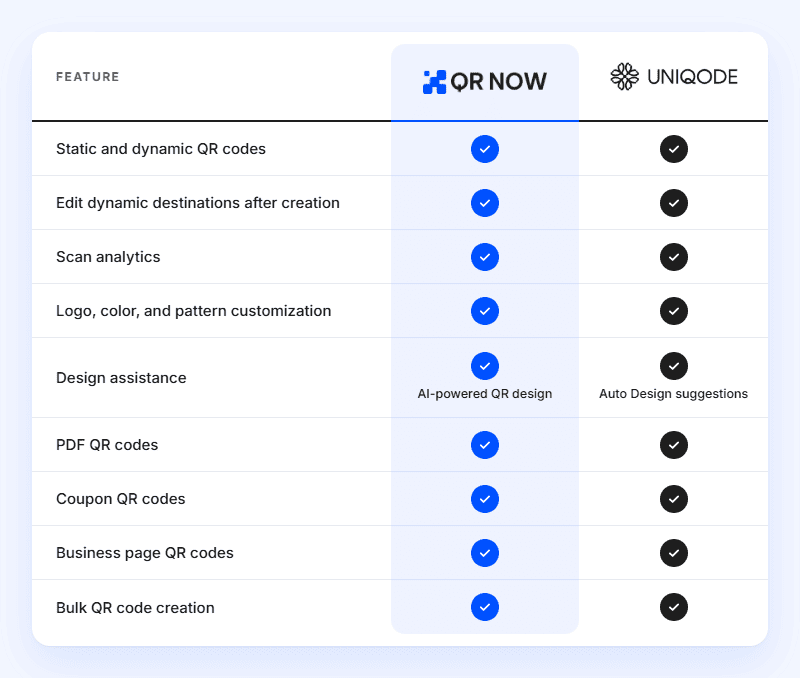
Both platforms cover the main tools you need to create branded, editable QR codes. QRNow combines these features with unlimited codes and scans, while Uniqode offers more automation and team controls.
How We Conducted This Comparison
Our team reviewed and tested QRNow and Uniqode using similar plans for comparable QR code creation tasks.
The comparison covers:
- Subscription prices and billing commitments
- Dynamic code allowances and scan limits
- Supported formats and marketing uses
- Design and bulk creation tools
- Analytics, integrations, and team controls
- Security information and support options
These features and pricing we are covering are current as of October 2026; these prices or features may change over time.
QRNow vs. Uniqode: Subscription Costs Compared
QRNow offers the same core subscription features across different billing periods. Uniqode separates its plans by code allowances and additional capabilities.
| Pricing factor |
QRNow |
Uniqode |
|---|---|---|
| Trial | Seven days of full access for$1.00 | 14-day free trial |
| Paid plans | Monthly plan: $39.95/month after the trial
Quarterly plan: $24.95/month billed every 3 months Annual plan: $14.95/month billed annually (save 62.5% compared to monthly or 40% compared to quarterly) |
Essential: $9/month Core: $49/month Plus: $99/month Business+: $399/month Enterprise: Custom pricing. All listed rates are billed annually |
| Annual subscription | $179.40/year ( $14.95/month equivalent)* | Essential: $108 Core: $588 Plus: $1,188 Business+: $4,788 |
| Dynamic QR codes | Unlimited on all plans | Essential: 15 Core: 250 Plus: 500 Business+: 2,000 Enterprise: Custom |
| Annual scan allowance | Unlimited on all plans | Essential: 50,000 Core: 1 million Plus: 2 million Business+: Unlimited |
| Cost for 10 dynamic codes | $179.40/year with annual billing | Essential, $108/year |
| Cost for 100 dynamic codes | $179.40/year with annual billing | Core, $588/year |
| Cost for 500 dynamic codes | $179.40/year with annual billing | Plus, $1,188/year |
| Main pricing advantage | Unlimited codes and scans without upgrading for more capacity | Lower entry cost for smaller campaigns |
Static Codes, Dynamic Codes, and Limits
Both platforms support static and dynamic QR codes. Static codes contain fixed information, while dynamic codes let you change destinations and track scans.
|
Feature |
QRNow |
Uniqode |
|---|---|---|
| Static QR codes | ✓ | ✓ |
| Dynamic QR codes | ✓ | ✓ |
| Edit dynamic destination | ✓ | ✓ |
| Track dynamic scans | ✓ | ✓ |
| Dynamic codes on paid plans | Unlimited | Essential: 15 Core: 250 Plus: 500 Business+: 2,000 Enterprise: Custom |
| Annual dynamic scan allowance | Unlimited | Essential: 50,000 Core: 1 million Plus: 2 million Business+: Unlimited |
| Ongoing subscription for dynamic service | Required | Required |
| Built-in analytics for static codes | X | X |
The main difference is how much capacity your subscription includes. Uniqode states that dynamic codes become inactive if you exceed your scan allowance.
If you expect substantial traffic from marketing materials like packaging, posters, or advertising, consider scans as well as the number of codes you need.
QR Code Types Included in QRNow and Uniqode
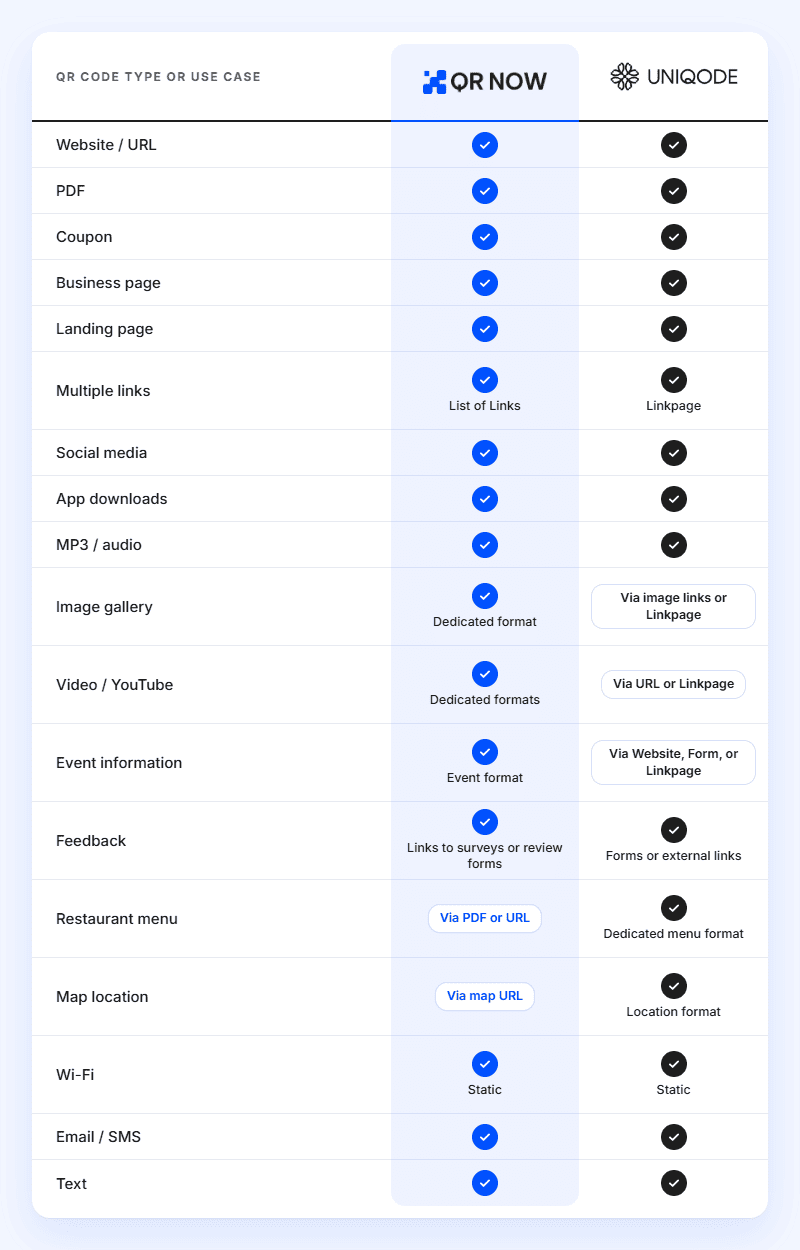
Both QRNow and Uniqode cover common uses such as website links, documents, promotions, and app downloads. Some options use dedicated formats, while others rely on a URL or landing page.
Uniqode vs. QRNow: Bulk Creation and Management
Each platform lets you upload a spreadsheet to generate multiple codes. The main differences are the supported upload formats and batch limits.
|
Feature |
QRNow |
Uniqode |
|---|---|---|
| Bulk QR code creation | ✓ | ✓ |
| CSV uploads | ✓ | ✓ |
| XLSX uploads | Export to CSV first | ✓ |
| Bulk URL codes | ✓ | ✓ |
| Bulk vCard codes | ✓ | ✓ |
| Customize bulk designs | ✓ | ✓ |
| Dynamic codes per batch | Up to 30 | Essential: Up to 15 Core: Up to 250 Plus: Up to 1,000 Business+: Up to 5,000 Enterprise: Up to 10,000 |
| Edit and track generated dynamic codes | ✓ | ✓ |
Analytics and Tracking
When looking at analytics and tracking your codes, you can look at each platform’s placements, identify popular content, and adjust campaigns.
|
Analytics feature |
QRNow |
Uniqode |
|---|---|---|
| Total and unique scans | ✓ | ✓ |
| Real-time scan reporting | ✓ | ✓ |
| Scan trends over time | ✓ | ✓ Plan-dependent detail |
| Geographic data | ✓ City and region | ✓ Location reporting on eligible plans |
| Device information | ✓ Operating system | ✓ Device, operating system, and browser reporting |
With QRNow and Uniqode, you could place different codes on flyers and counter displays, then compare the number of scans they receive. To measure sales or registrations, connect those visits to your website’s conversion tracking.
API and Integrations
Both platforms support external tracking tools. Uniqode goes further with connections that help you automate QR creation and management.
|
API or integration |
QRNow |
Uniqode |
|---|---|---|
| Google Analytics 4 | ✓ | ✓ Eligible plans |
| Facebook / Meta tracking | ✓ Facebook Pixel | ✓ Meta Ads integration, subject to access |
| Google Tag Manager | ✓ | N/A |
| Public QR code API | X | Core and above |
| Zapier | X | Core and above |
| Google Sheets workflows | CSV export for manual uploads | ✓ Documented integration |
Teams and Agencies
QRNow is the ideal platform for freelancers and small businesses that manage campaigns centrally, and the platform gives you unlimited codes without upgrading for more storage space.
Uniqode offers more structured collaboration, including user roles on Plus and above. It is the stronger option when several people need different permissions or separate organizational access.
Security and Privacy
In terms of making sure your details aren’t stolen, QRNow uses SSL/TLS encryption, limits data retention, and lets you request access to or deletion of your information.
On the other hand, Uniqode publishes additional security assurances, including SOC 2 Type II and ISO 27001:2022, alongside account controls. These may matter if your organization requires formal security documentation before choosing a provider.
Support and Documentation
If you feel getting in touch is important, both platforms offer strong customer support. QRNow has email support and phone assistance Monday through Friday, 8 a.m. to 9 p.m. EST, plus practical guides.
Uniqode provides users with 24/7 support through channels including chat, email, and phone. The platform’s help center and API documentation offer additional guidance for technical setups.
Where Uniqode Is Better
Go with Uniqode if you feel features such as API access, automated workflows, larger bulk uploads, or team permissions are going to be important for your workflow.
Its integrations and account controls make it a stronger fit for managing QR codes across departments or connected systems. These capabilities can justify a higher subscription when they reduce manual work or meet organizational requirements.
Where QRNow Is Better
Create QR codes with QRNow if you want unlimited dynamic codes and scans, flexible billing periods, and AI-powered design.
Also, if you are self-employed or a small business owner, it is ideal for creating regular marketing campaigns without advanced administration needs. You can add codes for new promotions and placements without upgrading your allowance, although bulk uploads remain limited to 30 codes.
Recommendation by User Type
The table below can help you choose the platform that matches how you create, manage, and track your QR codes, based on your needs.
|
You are… |
Our recommendation |
Reason |
|---|---|---|
| Sharing a permanent link without tracking | Either platform | A static code may be enough |
| Creating only a few dynamic codes | Uniqode Essential | Lower annual entry cost |
| A freelancer running regular campaigns | QRNow | Unlimited codes and scans |
| A small business testing multiple placements | QRNow | Create separate codes without increasing your budget |
| Focused on creative QR design | QRNow | Prompt-based AI design |
| Managing large bulk campaigns | Uniqode | Larger uploads on eligible plans |
| Looking for a published monthly subscription | QRNow | Monthly billing option |
How To Switch From Uniqode to QRNow
If you are interested in making the switch from Uniqode to QRNow’s annual plan that provides unlimited dynamic QR code creation, there are a few things you’ll need to do.
Before creating a campaign in QRNow, save your destinations, files, and available analytics, then recreate and test your campaigns in QRNow.
Existing printed dynamic codes usually need replacing because the new codes use different redirect addresses.
Keep Uniqode active while old codes remain in circulation. If you control the redirect domain, confirm migration options with both providers.
Frequently Asked Questions
-
Yes, it’s a great alternative, especially if you are a retail shop owner, freelancer, or other type of small business owner, as it combines dynamic QR codes, scan analytics, customization, and AI-powered design. It is a good fit if you want unlimited codes and scans without needing advanced team controls or automated workflows.
-
You can recreate your campaigns in QRNow, but existing dynamic codes generally cannot be transferred directly. Printed codes may need replacing because your new QRNow codes use different redirect addresses.
-
QRNow suits small businesses like restaurants and shops that regularly create marketing codes and want unlimited usage. Uniqode may be better for you if you only need a few codes or require integrations and separate team permissions.
-
Yes, both platforms let you change dynamic QR code destinations without replacing the printed code, provided your subscription remains active. However, keep in mind that static codes cannot be edited, so choose dynamic codes when your content may change.
