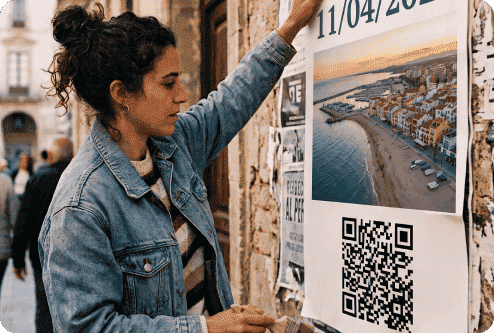

Quick Answer: If you have one main goal with your poster, a Link QR code is probably the most useful option. Send people straight from your poster to the page where you want them to make a purchase or reservation, or get more details.
Best QR Codes for Different Poster Goals
Think about the step you want customers to take once they scan your QR code. The best QR code is the one that gets them there with the least effort. You can see some of the different options and when they are the best choice in the table below:
|
Goal |
Best QR Code Type |
Why It Works |
|---|---|---|
| Best option overall | URL QR Code | Take viewers straight to your campaign page, website, booking page, or other main destination. |
| Turn interest into event attendance | Event QR Code | Let viewers move directly from your poster to event details, registration, or ticket information. |
| Encourage an immediate purchase | Coupon QR Code | Give customers fast access to a discount or promotion while your poster has their attention. |
| Capture leads or appointments | Landing Page QR Code | Send prospects to a focused page where they can enquire, register, book, or sign up. |
| Add richer visual content | Video QR Code | Extend the poster with trailers, demos, interviews, or tutorials that print cannot show. |
| Connect viewers with your social channels | Social Media QR Code | Help people find and follow your social profiles without searching for them manually. |
| Provide detailed supporting material | PDF QR Code | Give viewers access to brochures, schedules, menus, guides, or other documents. |
| Offer several useful next steps | List of Links QR Code | Present multiple relevant destinations when one poster needs to support several actions. |
Why Add a QR Code to Your Poster?
A QR code gives people a clear next step after seeing your poster. The table below details some of the numerous benefits of adding a code to any type of poster:
|
Benefit |
How It Helps You |
|---|---|
| Turn attention into action | Send people to tickets, bookings, offers, or registrations, remove the need to type URLs or Google your business, give viewers an immediate next step |
| Share more details without cluttering your poster | Link to schedules, brochures, product details, or videos, keep your poster focused, move supporting content online so your poster looks better |
| Measure engagement | Track scans and analyze the results, compare different poster locations or campaigns, use results to improve future promotions |
How To Create QR Codes on Posters
Create a custom poster QR code with QRNow’s QR code generator. Follow these steps to connect your poster to the action you want viewers to take.
-
Make a QRNow account to get started
Sign up with QRNow and start building your code. You can make as many codes as you like, for different campaigns and posters.
-
Choose what viewers will access
Decide where your QR code should lead. You could link to tickets, a booking page, an offer, a video, event details, or your website.
Choose the destination that best supports your poster’s main goal.
-
Customize your poster QR code
Next, customize your code so it matches your poster and brand. You can adjust the colors, frame, and logo
-
Download a high-quality code
Download your QR code as a PNG, JPEG, or SVG. You’ll receive a high-quality file so the code stays sharp when added to your poster or resized.
-
Add and test it on your poster
Place the QR code where viewers can easily see and reach it. Add a direct CTA such as “Scan for Tickets,” “Claim Offer,” or “Learn More.” Make sure to test that it works on different devices.
-
Track poster engagement
Use QR code analytics to track how people are interacting with your poster. You can directly compare scans across campaigns. This can help you understand which placements generate more engagement, helping you with future campaigns.
How QR Codes Are Used on Posters in Real Life
A number of businesses use QR codes on posters for various real-life applications:
-

Concerts & festivals
Attendees can scan a QR code on a concert or festival poster to buy tickets instantly, view event schedules, or access artist lineups.
Additionally, QR codes on posters can link to exclusive behind-the-scenes content, merchandise discounts, or contests, encouraging deeper engagement and enhancing the overall event experience.
-

Retail & promotions
Businesses use QR codes on promotional posters to direct customers to online stores, exclusive discounts, or limited-time offers. This strategy helps drive sales and improves customer engagement.
-

Education & museums
Museums and educational institutions include QR codes on posters to provide deeper insights into exhibits, educational resources, or guided tour information. Visitors can scan and access multimedia content such as videos and interactive timelines.
-

Healthcare & clinics
Clinics, pharmacies, and healthcare providers can use poster QR codes to share appointment booking pages or patient resources.
Make sure to keep the destination clear so users know exactly what information they will access, and trust that it’s an official healthcare-related page.
-

Gyms & fitness centers
Gyms and fitness studios can place QR codes on posters to promote class schedules, book classes, or sign up for membership. This gives potential customers a quick way to act while the promotion is still fresh.
-

Real estate
Realtors use QR codes on property posters to provide potential buyers with virtual tours, property details, or contact forms, making the house-hunting process more interactive and informative.
Best Practices for QR Codes on Posters
These best practices will help you keep your poster QR code easily visible and easy to use. Read on to discover how to create poster QR codes that drive engagement.
QR Code Size for Posters: Indoor vs Outdoors
The farther someone is from your poster, the larger your QR code needs to be. A common starting point is a scanning-distance-to-code-size ratio of about 10:1.
The table below gives you an idea of how big your QR code should be depending on how far you think the person scanning will be from your poster.
|
Poster Type or Scan Distance |
QR Code Size |
|---|---|
| Indoor poster scanned from 1 ft | Around 1.2 in wide |
| Indoor wall poster scanned from 3 ft | Around 3.6 in wide |
| Outdoor poster scanned from 6 ft | Around 7.2 in wide |
| Large outdoor poster scanned from 10 ft | Around 12 in wide |
You should think about where the person scanning is most likely to scan from, and increase the size accordingly.
Poster QR Code Design and Print Specifications
Your QR code must remain clear when the poster moves from the design file to its final printed size.
- Keep the QR code square and undistorted
- Use strong contrast between the code and background
- Use a high-quality or vector file for large prints
- Check outdoor materials for glare or reflections
- Test the final printed poster before displaying it
A standard QR Code requires a quiet zone of four blank spaces on every side. Removing or covering this space can reduce scanning reliability.
Make Your Poster QR Code Feel Safe to Scan
Tell viewers who the code belongs to and what they will get by scanning it. You should always add a direct, easy-to-understand CTA such as “Scan for Tickets,” or “Apply Now.”
It’s also important to make sure that the destination matches that promise and remains active. Keeping your brand highly visible on the poster can also build trust.
FAQs
QR codes can significantly boost your poster's effectiveness, but you may have questions about best practices. Below, we answer some of the most common queries to help you maximize the impact of your QR codes on posters.
-
A QR code should be at least 2 cm x 2 cm (0.8 inches x 0.8 inches) but ideally larger for easier scanning from a distance. A size of 3–5 cm (1.2–2 inches) minimum is recommended for posters to increase readability.
-
Position the QR code in an accessible area without clutter. The lower-right corner often works well, but eye-level placement ensures better visibility and interaction. Make sure there's contrast between the QR code and the background.
-
If you've generated a dynamic QR code, you can edit its destination even after printing. However, static QR codes cannot be changed post-printing.
-
Follow the following tips to optimize your QR code on a poster:
- Use a compelling CTA: Add a clear call-to-action like "Scan to learn more./li>
- Ensure high contrast: A dark QR code on a light background improves readability.
- Test before distributing: Confirm that it scans easily on different devices.
- Provide value: Link to engaging, relevant content that encourages interaction.
By implementing these optimization techniques, you can increase the number of scans and improve user engagement with your QR codes.
