Step-By-Step QR Code Editing Guide

Need to change your QR code’s destination? Wondering if QR code editing is even possible? Look no further!
We’ll take you through the ins and outs of adjusting QRs like a pro, using the QRNow.com editor.
Can You Edit Any QR Code?
Not every QR code can be edited once it has been created, but dynamic QR codes give you flexibility to update your content without changing the printed code.
Efficient editing and management of QR codes allow businesses to keep their information relevant and engaging. There are 2 different types of codes you can use:
- Static QR codes: These types of codes are permanent and cannot be changed or edited.
- Dynamic QR codes: Offer flexibility, allowing edits without reprinting, making them perfect for updating coupon QR codes, PDF codes, and more.
In short, static QR codes can’t be edited after creation, but dynamic QR codes can be updated as many times as you need.
How To Edit a QR Code Using QRNow’s Generator
So, how do you actually edit a QR code using our editor? Here’s a quick step-by-step guide:
-
Log in to your account
Enter your credentials to access your account.
-
Choose your QR code
Go to “QR Codes” in the left-hand menu. Use the filters to find the QR code you want to edit.
-
Make your edits
Next to the “Download” button, click the three-dot icon and select “Edit.” Depending on the type of code, you can edit your QR code to redirect customers to a new website or update the PDF they download.
-
Change your design
Click “Next” to access the design editor. You can:
- Change the frame
- Apply your brand colors
- Update the call-to-action text
- Replace your business logo
-
Save your changes:
Click “Finish” to apply your changes. Then scan the QR code with a mobile device to make sure it leads to the new URL or displays the updated design as intended.
With dynamic QR codes, you can make changes to key details, such as:
-

Colors
Select colors that best fit your brand and your business’s style.
-

Contact details
Update your business’s contact information if you change your email or phone number.
-

Content and links
If you’ve changed a link or any content, you can update the URL or file at any time.
-

Promotions
Add a discount or limited-time offer without changing your code.
At QRNow.com, if you're signed up with a subscription, you can create all the dynamic codes you need.
QRNow data insight: With 73% of our B2B users on annual plans, it's clear that many businesses are thinking long-term when it comes to their QR code campaigns.
Based on aggregated and anonymized QRNow customer usage data collected in 2025.
Editing the internal content of a QR code
The “internal content” of a QR code usually refers to the destination it directs users to after scanning, such as a landing page URL. Only dynamic QR codes allow this content to be changed.
Dynamic QR codes point to a redirect link on a server, which you can update at any time from your account. The printed code remains the same, but the page it directs users to can be modified.
Static QR codes, on the other hand, store the destination URL directly in the pattern. Once printed, this information cannot be changed.
Pausing a QR code
Yes, you can pause dynamic QR codes to block access to the destination URL. This is useful for out-of-stock products or seasonal offers, for example.
Here’s how to pause a QR code using QRNow.com:
- Log in to your account: Enter your credentials to sign in to your account.
- Choose the QR code: Go to “QR Codes” in the left-hand menu. Use the filters to find the QR code you want to pause.
- Pause the code: Next to the “Download” button, click the three-dot icon and choose “Pause.”
- Save your changes: A pop-up message will appear asking you to confirm the action. Select “Yes, pause” to temporarily deactivate the QR code.
A paused QR code will stop tracking new scans. You can reactivate the code and resume its analytics from your account once the URL is ready to go live again.
How To Customize and Brand Your QR Codes for a Unique Look
QRNow.com’s generator makes it easy to design custom codes that reflect your brand identity. Here are some simple ways to make your QR codes stand out:
-

1. Customize colors and patterns
Choose contrasting colors and unique patterns to optimize readability and make your QR codes visually appealing.
-
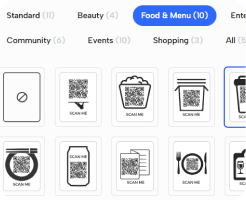
2. Choose a frame
Select from categories like "Entertainment," "Food and Menu," "Shopping," and more to find a frame that best fits your campaign or use case.
-

3. Add your logo
Upload your brand’s logo or create a new one with an AI prompt to embed it in the center of the QR code, reinforcing brand recognition and authenticity.
These customization options allow you to create QR codes that not only function well, but also optimize your brand presence on any type of marketing material.
Use Cases of Editable QR Codes
With editable QR codes, you can update content as campaigns evolve or business details change, all without reprinting materials. Here’s how to use these codes to keep information up to date:
Add new menu items
Restaurants can reduce printing costs by using editable QR codes for their digital menus. This allows you to update menu items or adjust prices at any time without having to replace the QR codes already placed on the tables.
Offer exclusive discounts
Retailers can increase sales with a single dynamic QR code on their product packaging. You can launch a summer offer and later update the same code to feature holiday campaigns or other seasonal discounts.
Update event schedules
Guests and program times can change at the last minute. Event organizers can instantly update the schedule using a dynamic QR code on flyers, making sure all attendees have access to the latest agenda in real time.
Update property listings
Real estate agencies can keep property information up to date by linking QR codes on yard signs or window displays to a listing page. The page can be updated whenever details like pricing or availability change.
Editing QR Code FAQs
Can you reverse a QR code?
Toggle faqs
No, you cannot "reverse" or retrieve any lost data from a QR code once it has been changed or deleted.
However, with dynamic codes, you can edit the type of QR solution, update the linked content, or even change the design to make it similar to how it was before. Static QR codes, however, cannot be edited or reversed.
Why should I use a dynamic QR Code for business and marketing?
Toggle faqs
Dynamic QR codes are a game-changer for businesses and marketing efforts. Here’s why:
- Flexibility: Change the content linked to your QR without needing to reprint or redistribute your marketing materials for offers and promotions.
- Trackability: You can see how many people are scanning your code, when they’re scanning it, and even where the scan takes place.
- Cost-effective: Since you can update the content behind a dynamic QR, the same QR code can be reused for different campaigns, saving you time, effort, and money in the long run.
What happens to QR code analytics when I edit a code?
Toggle faqs
Editing a dynamic QR code does not delete or reset any previous analytics. All scan data collected before the update, including total scans, remains intact.
After updating the destination URL or making changes to the design, the QR code continues to track new scans. This allows you to review the QR code’s performance over time.
Static QR codes, on the other hand, contain fixed data. They do not provide ongoing analytics and cannot be edited once generated.
Do I need to reprint my QR code after editing?
Toggle faqs
Don’t worry about the old versions that you’ve already printed — they will still work, too, even if they look different from your new design.
The old style of the QR code and the updated version will both link to the same content.
You will be able to track the scans from both versions as well.
Wondering how many QR codes can exist for the same content? In theory, as many as you like! You can come back and make more changes to your QR code design in the future, and all your past designs will still work.
Can the information in a QR code be upgraded?
Toggle faqs
Yes, if it’s a dynamic QR code. With dynamic codes, the printed pattern stays the same, but the destination URL it links to can be updated directly from your account.
You can also change the QR code’s design, like adding a frame or applying your brand colors. Always make sure the QR code remains easy to scan.
Are QR codes permanent or temporary?
Toggle faqs
QR codes are generally permanent, but they can become inactive under certain conditions.
- Static QR codes encode a fixed URL directly in the pattern. They do not expire unless the destination URL changes or the page is deleted.
- Dynamic QR codes point to a redirect link managed by your QR platform. The code will continue to work as long as your subscription is active and there are no scan limits.
