What Type of QR Code Should You Use for Your Ticket?

Quick Answer: A dynamic URL QR code is best for tickets because it allows your staff to scan for instant check-ins and lets you update event info anytime. But other types of codes can be useful for specific tasks.
Review the following table to see which QR code on your ticket will work best depending on your goals.
|
Ticket goal |
Best QR code type |
Why it works |
|---|---|---|
| Fast gate entry & check-in | Dynamic URL QR code | Allows instant barcode or URL scanning for ticket validation and can be updated at any time. |
| Sharing event details & maps | PDF or landing page QR code | Instantly links attendees to digital agendas, seating charts, venue maps, and event guidelines. |
| Improving social media engagement | Social media QR code | Directs ticket holders to event hashtags, photo contests, and social channels to create hype before and during the event. |
| Adding events to a calendar | Event QR code | Automatically adds the event date, time, and location to the attendee’s personal calendar when scanned. |
QR data insight: A study in "Innovative Computing and Communication: An International Journal” explored the use of QR codes in ticketing systems, finding that it reduces the need for computational resources and internet data usage when issuing tickets.
 Join thousands of creators
Turn every ticket into a better event experience with dynamic QR codes
7-Day Full Access
$1.00
Then $39.95/month, billed automatically until you cancel. Cancel anytime from your account. Prices may vary depending on your country and current promotions.


Everything Included
-
 Unlimited QR codes, scans & bulk creation
-
AI-powered dynamic & static designs
-
Real-time analytics & scan tracking
-
Export PNG · SVG · PDF · EPS
-
Bank-grade storage & full backups
-
Team accounts & custom roles
How To Create a QR Code for Tickets
First time here? See our how to make a QR code guide for tips before you begin. Here’s a simple guide on how to create a QR code for tickets:
-
Select the information to encode
Our QR code ticket generator allows you to select from multiple QR types, such as URLs, landing pages, videos, and more. Choose the option that best fits your requirements.
-
Generate your QR code
Use our reliable QR ticket generator to create your unique code. You can choose to create a dynamic QR code that will allow you to edit the linked material at later dates.
-
Customize your QR code
Customize the design of the QR code to align with your event’s branding. You can change the color, shape, and add a logo within the QR code, making it not only functional but also visually appealing.
-
Generate and test the QR code
After entering all necessary data and finalizing the design, generate the QR code. Test the QR code with several devices and scanning apps to ensure it works consistently and can be read easily from any smartphone.
-
Integrate the QR code into your ticket design
Download and incorporate the QR code into your ticket layout. Place it prominently for easy access for scanning at the event entry. Consider the overall design and make sure the QR code does not overshadow other critical event details.
How To Use QR Codes on Tickets for Concerts, Private Events, and More
-

Concerts & live music
Speed up gate entry for large crowds with ticket QR codes that integrate with digital wallets. Attendees scan, and organizers can link codes to set times or exclusive playlists.
-

Conferences & trade shows
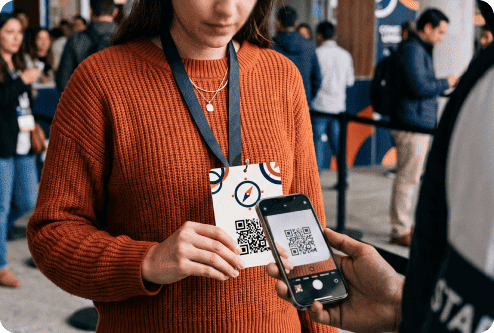
Optimize badge pickup and networking by adding QR codes to event passes and making check-in instant with a scan of printed credentials. Attendees can also scan each other’s badges to share contact details and booth materials.
-

Sporting events
Manage stadium rushes with dynamic QR codes on game tickets. Fans can quickly scan through turnstiles, order food directly, and do more using the same code.
-

Museum & attractions
Avoid long admission lines by offering mobile QR code tickets for timed entry slots. Visitors scan at the door and get instant access to digital audio guides, floor plans, and more.
-

Transport & transit tickets
Make passenger boarding simple for buses, trains, and other transport with scannable ticket QR codes that staff can validate quickly, while passengers stay updated on live schedule changes and arrival times.
-

Private events & weddings
Manage guest lists easily with custom QR code invitations for weddings and parties that guests can scan to confirm attendance or even upload party photos straight to an online gallery.
Best Practices for Using QR Codes on Tickets
With ticket QR codes, you can automate several aspects of the event entry process, from fast-tracking admissions to facilitating secure, hassle-free check-ins.
Here is what you can do with your QR codes on tickets to make sure they are used the best way possible for your events.
Make events more effective
QR codes for tickets enable a more organized event management system. Use them for quicker check-ins and instant access to seating and scheduling information to ease the workload on staff and improve the overall flow of events.
Access real-time attendee data
Implement QR codes on tickets for real-time data collection. Event organizers can track attendance patterns, gather demographics data, and adjust logistics on the fly to accommodate actual attendee behavior.
Optimize size and contrast for quick scanning
QR codes on tickets need high contrast and proper sizing to prevent delays when scanning. Print the code at least 0.8 x 0.8 inches (2 x 2 cm) using a dark design on a light background for instant scanning, even in low-light conditions.
Add clear call-to-action microcopy
Include short instructional text next to the code to create a better check-in experience. Simple copy like “Scan at entry for fast access” can help set clear expectations and avoid confusion at entry.
Position codes away from fold lines and tear strips
When using printed tickets, make sure to place the QR code away from perforations or folds. This will help keep the code layout intact to avoid the code being ripped off or damaged.
Enable offline caching for digital mobile tickets
Store QR codes on mobile tickets directly in device wallets or local storage to bypass venue internet. This helps prevent loading delays in case of a poor network connection.
QR Code Ticket Print Specifications
When printing and placing your QR codes on tickets, there are a number of things you should keep in mind.
|
Print element |
Recommendation |
|---|---|
| QR code format | Use vector formats like SVG or EPS to prevent pixelation when scaling ticket layouts. |
| Quiet zone | Keep a clear margin around the code so handheld scanners can detect it instantly. |
| Contrast & color | Use high-contrast dark codes on light backgrounds and avoid inverted or low-contrast brand colors. |
| Ticket finish | Choose matte paper finishes, such as glossy stock or plastic laminates, because they cause lighting glare under scanners. |
| Placement & margin | Keep codes away from tear-off stubs and fold lines to avoid damage to the code. |
| Test print | Always test a physical sample with actual venue scanners before printing the full batch. |
Best QR Code Size for a Ticket
To make sure QR codes can be scanned reliably on your tickets, they should be printed in the correct size.
|
QR code use case |
Recommended QR code size |
|---|---|
| Standard paper ticket | 0.8 x 0.8 in / 2 x 2 cm minimum |
| Mobile wallet pass | 1 x 1 in / 2.5 x 2.5 cm on display |
| QR code with logo | 1.1-1.3 in / 2.8-3.3 cm or larger |
| Event wristband/stub | 0.6-0.75 in / 1.5-1.9 cm (test readability on curved surfaces) |
How To Place a QR Code on Tickets
The best position for your QR codes on tickets depends on the layout and action you want your guests to take. Follow these recommendations:
- In the center when scanning for entrance check-in is the main objective.
- On the detachable stub for quick tearing and manual verification.
- Beside event details like seat numbers or gate info.
- On the back to keep the front design clean while hosting additional info like venue maps.
- Near a clear instruction like “Scan at gate” to direct attendees.
It’s also a good idea to avoid placing the QR codes too close to the edge or trim lines of the ticket and avoid placing them near fold lines or on top of busy background graphics.
FAQs
-
The QR code should be placed in a clear, accessible area on the ticket where it can be easily scanned without causing entry delays. It’s important to avoid covering the QR code with other text or images.
-
Yes, QR codes on digital tickets can be scanned directly from a mobile screen. Ensure the screen brightness is sufficient and the QR code is displayed fully on the screen to facilitate smooth scanning.
-
Absolutely! QR codes can link to a page providing additional information about the event, such as detailed schedules, venue maps, performer bios, or even special announcements.
-
No, a QR code is not the same as a ticket; it acts as the entry pass attached to the ticket or another surface that can be scanned and validated instantly.
-
You cannot have the same QR code on every ticket, as a unique code is needed to validate every attendee’s pass. That way, scanners at the event can track individual check-ins and prevent unauthorized entry.
-
Yes, scammers can easily read digital QR codes directly from phone screens. However, the display must be clear and bright enough to reflect light.
-
If a code does not scan, the staff can manually enter the alphanumeric backup code printed near the QR code or look up the attendee’s booking reference in the system.
-
By using dynamic QR codes, you can continuously refresh them or link them to encrypted server databases to prevent counterfeit screenshots and copied physical tickets from being accepted.
-
Yes, static or pre-cached QR codes work offline for validation. However, live server syncing needs an active internet connection to update entry status.
