Transparency statement: This comparison is based on publicly available information and our own product testing. You can learn more about how we compare our service to others by reading our Editorial Guidelines.
Quick Comparison: QRNow vs. QRFY
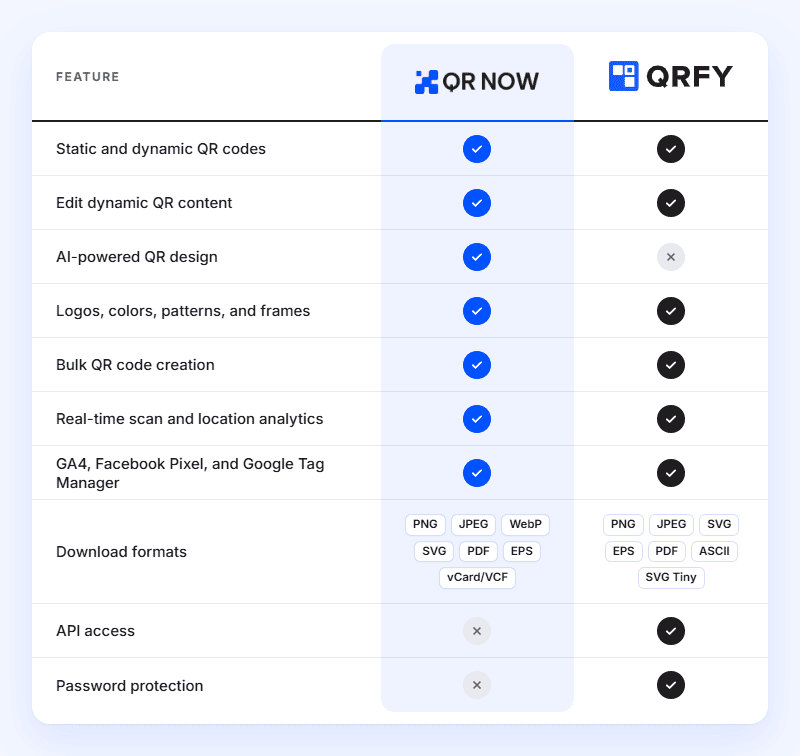
Both of these services offer a wealth of features. You can find a breakdown of what they offer below:
How We Compared QRNow and QRFY
We evaluated QRNow and QRFY using the same criteria to make sure that the comparison was fair. We tested both extensively, looking at:
- QR code creation
- Customization features
- Analytics
- Management tools
- Pricing plans
QRNow vs. QRFY: Pricing and Real Cost of Creating Codes
Both platforms offer different subscription options, so let's compare what you'll pay and what you get with each service.
|
QRNow |
QRFY |
|
|---|---|---|
| Entry option | 7-day full access with our $1.00 trial | 7-day free trial |
| Paid plans | Monthly plan: $39.95/month after the trial
Quarterly plan: $24.95/month billed every 3 months Annual plan: $14.95/month billed annually (save 62.5% compared to monthly or 40% compared to quarterly) |
3-month plan: $39/month, billed $117 every 3 months 6-month plan: $29/month, billed $174 every 6 months Annual plan: $19/month, billed $228 annually |
| Dynamic QR codes | Unlimited | Unlimited |
| Scans | Unlimited | Unlimited |
| Best pricing advantage | Unlimited usage with a simpler pricing structure | Free trial and lower costs with longer subscriptions |
QRNow’s pricing plans give you more flexibility. You can purchase a monthly subscription if you prefer not to commit to several months upfront. Our quarterly and annual plans also work out cheaper.
QR Code Types, Features, and Limits Offered By QRNow and QRFY
QRNow and QRFY offer plenty of different QR code types.
Both platforms support static and dynamic QR codes. Static codes contain fixed information, while dynamic codes let you update content and track scans without creating a new code.
You can also create unlimited dynamic QR codes with unlimited scans on either platform's paid plans.
QR Code Types Available
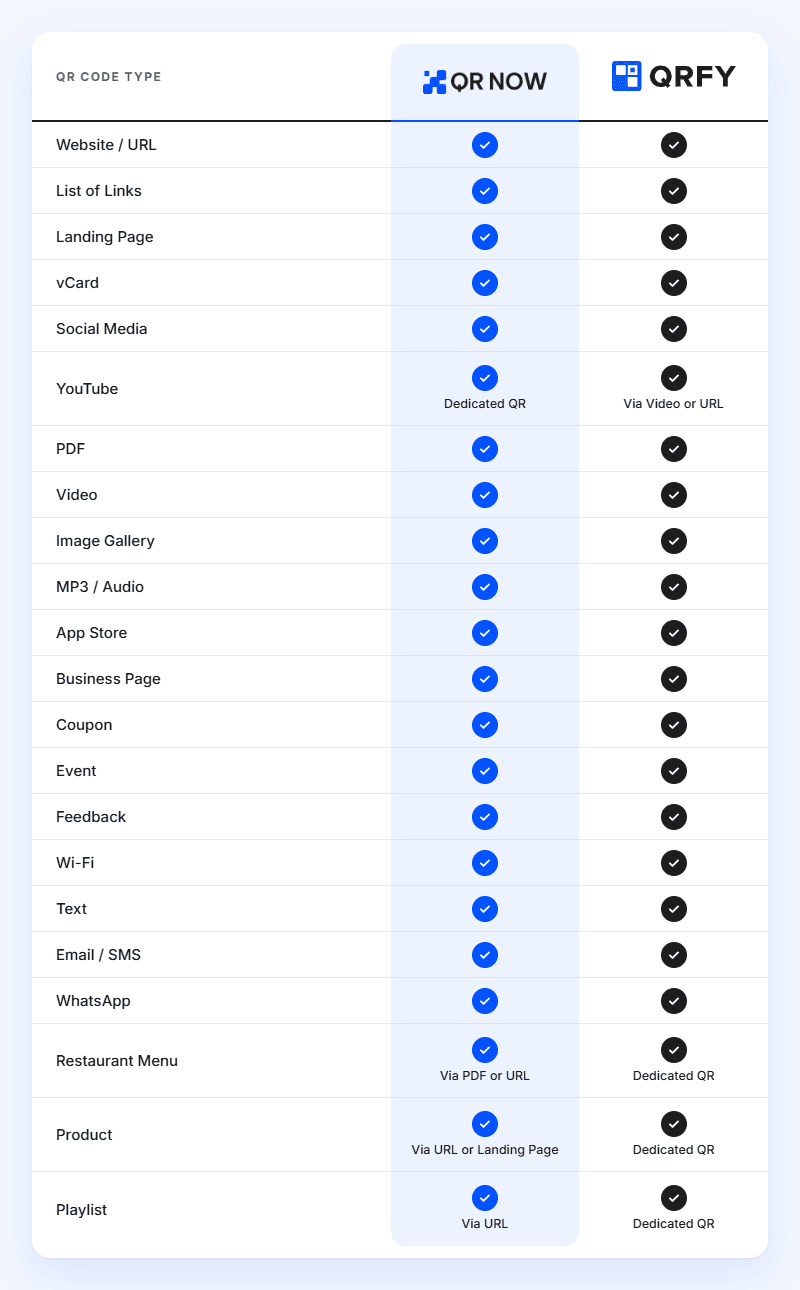
QRFY offers dedicated solutions for products, restaurant menus, and playlists. However, you can achieve many of the same results with QRNow by simply using a URL or PDF code.
Ease of Use: Which Is Simpler?
Both QRNow and QRFY offer intuitive interfaces that are quite easy to get the hang of. Their generators guide you through the QR code creation process.
QRNow keeps things straightforward, so that anyone can create and customize codes.
All of our main tools are easy to use, and we have even incorporated built-in AI customization tools to help you create more distinctive codes.
QRFY offers a similar experience, with additional management features such as tagging to organize your campaigns. However, they currently do not offer any AI customization features.
Both platforms are also mobile-friendly, allowing you to easily create codes on the go.
Design and Customization: QRNow’s Creative Advantage
Your QR codes should reflect your brand, whether you're using them on product packaging, business cards, or marketing materials.
Both QRNow and QRFY offer a range of customization options, including:
- Colors and patterns to match your branding
- Custom logos to make your codes recognizable
- Dot shapes and frames to personalize their appearance
- Call-to-action text to encourage people to scan
However, QRNow’s main advantage is its built-in AI-powered QR design too, which can save you valuable time when planning your campaigns.
Simply describe your preferred colors, shapes, or themes and let AI generate a custom design that fits your vision. You can then preview the result and refine your prompt until you're happy with it.
If creative freedom matters to you, QRNow is the winner here.
How Do Bulk QR Code Creation Features Compare?
Both QRNow and QRFY let you create codes in large batches using CSV files.
Here's how their bulk creation features compare:
|
Feature |
QRNow |
QRFY |
|---|---|---|
| Bulk creation | ✓ | ✓ |
| Maximum codes per batch | 30 | 500 |
| Supported bulk QR types | URL and vCard | URL, PDF, and more |
| CSV file uploads | ✓ | ✓ |
| Edit dynamic QR content | ✓ | ✓ |
Although QRNow has a smaller batch limit, you can repeat the process as often as needed. It's a practical solution if you want to run smaller campaigns.
Which Platform Offers Better QR Analytics?
Knowing how people interact with your QR codes can give you a great insight into how your customers interact with your marketing materials. This is possible with QR code analytics.
QRNow and QRFY offer the following analytics features to help you better understand your customers:
- Real-time scan statistics
- Total and unique scans
- Scan trends over time
- Location tracking
- Operating system data
- CSV and XLSX data exports
- Google Analytics 4 integration
- Facebook Pixel integration
- Google Tag Manager integration
API and Integrations: What Do QRNow and QRFY Offer?
Both QRNow and QRFY support external marketing tracking tools, including Google Analytics and Facebook Pixel.
QRNow offers:
- Google Analytics 4
- Facebook Pixel
- Google Tag Manager
QRFY supports marketing tracking integrations and also offers a REST API. This lets you automate QR code creation, editing, and management through your own systems.
QRNow does not currently offer a public API. However, if your priority is tracking marketing campaigns rather than automating QR code creation, QRNow provides the main integrations you need.
Security and Privacy: How Do QRNow and QRFY Compare?
Both QRNow and QRFY take measures to protect your information, including:
- SSL/TLS encryption to secure data transfers.
- GDPR and CCPA privacy safeguards to protect personal information.
- Privacy policies explaining how user data is collected and handled.
QRFY offers an additional feature: password-protected QR codes, allowing you to restrict access to specific content.
Customer Support and Helpful Resources
Both platforms provide online resources and customer support.
QRNow gives you several ways to get contact our team:
- Phone support: Monday to Friday, 8 a.m. to 9 p.m. EST.
- Email support: Available 24/7, with responses within 72 hours
- Step-by-step guides and FAQs: Covering QR code creation, customization, and management
QRFY provides email support, a contact form, and a searchable help center covering account settings, QR code management, design, and analytics.
QRNow is particularly convenient if you prefer speaking directly with a support specialist.
Where QRFY Has an Advantage
QRFY offers additional features for more advanced QR code management, including:
- Larger bulk uploads of up to 500 codes per batch.
- Advanced management tools, including tagging and password protection.
These features may be useful if you're running a large business and want to run long or complex campaigns.
Where QRNow Stands Out
QRNow is a better choice if you do not need complex tools or do not plan on running very large campaigns.
Its main advantages include:
- AI-powered QR design for creating distinctive codes using text prompts.
- Dedicated marketing QR codes for YouTube, coupons, and feedback.
- Phone support for direct assistance.
- Flexible monthly billing with unlimited QR codes and scans.
Which Is Right for You, QRNow or QRFY?
The best choice depends on your business needs. You can see how they compare based on the feature you want below:
|
If you want to... |
Our pick |
Why |
|---|---|---|
| Creating your first QR codes | QRNow | Straightforward creation process and intuitive tools |
| Manage a small business | QRNow | Essential features, unlimited codes, and flexible billing |
| Run marketing campaigns | QRNow | Dynamic codes, real-time analytics, and marketing integrations |
| Create unique QR designs | QRNow | AI-powered design and extensive customization |
| Promote products or services | QRNow | Dedicated QR solutions for coupons, videos, and feedback |
| Get direct customer support | QRNow | Phone assistance alongside email support and guides |
| Automate QR code creation | QRFY | API access for connecting QR creation to other systems |
| Generate large batches of codes | QRFY | Up to 500 QR codes per batch |
| Restrict access to QR content | QRFY | Password-protected QR codes |
How to Switch From QRFY to QRNow
|
Step |
What to do |
|---|---|
| Back up your QRFY campaigns | Save your URLs, files, designs, and any analytics data you want to keep. |
| Set up your codes in QRNow | Choose the appropriate QR types, add your content, and customize your designs. |
| Update your published materials | Test your new codes and replace any existing QR codes that need to be transferred to QRNow. |
You cannot transfer existing QRFY dynamic QR codes directly to QRNow. You'll need to create new codes and replace the old ones wherever they're published.
However, your static QR codes should still work. To edit their content or track scans in QRNow, you'll need to create new dynamic codes that link to the same content.
Sources, Testing, and Limitations
To prepare this comparison, we tested QRNow and QRFY with a focus on:
- Features
- Pricing
- Limitations
We consulted both platforms' official websites and documentation to guarantee that any information was correct. Please note that the comparison was carried out in October 2026. Prices, features, and subscription terms may change over time.
Frequently Asked Questions
-
The static QR codes you make with both platforms can work indefinitely, provided their content or destination is not removed.
However, dynamic QR codes require an active subscription to keep working. Make sure you choose the right type based on your campaign plans before publishing your codes.
-
Yes. Both QRNow and QRFY let you update dynamic QR codes without reprinting them. Simply change their destination links and keep using the same printed code.
Static QR codes cannot be edited after creation.
-
Yes. Both platforms let you customize QR codes with logos, colors, and patterns.
QRNow also offers AI-powered design. You can enter simple text prompts to get customized QR codes instantly.
