What Is the Quiet Zone on a QR Code?
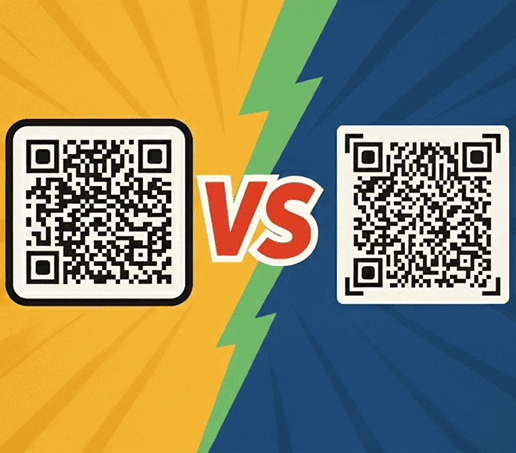
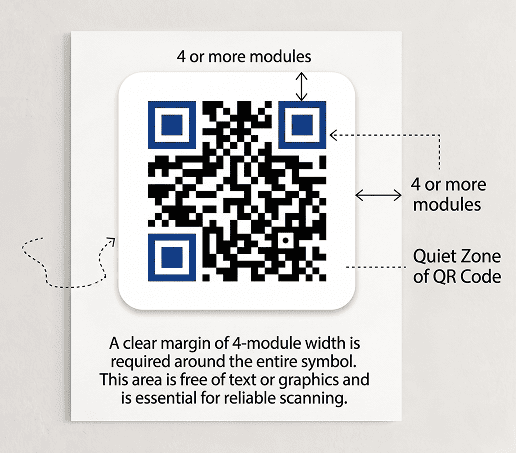
A quiet zone is the empty space that surrounds a QR code on all sides. This margin helps scanners clearly detect the edges of the code and separate it from nearby text, images, or background elements.
Without this space, the code can blend into its surroundings and become harder to scan. Even a well-designed code may fail if the quiet zone is too small or missing. Keeping this area clear ensures consistent scanning across devices and environments.
Why Is the Quiet Zone Essential for Scanning?
Having a proper quiet zone is important because it helps scanners clearly recognize the QR code and separate it from surrounding design elements.
Without enough empty space around the code, cameras may struggle to detect its edges correctly, leading to errors or failed scans.
Maintaining a proper quiet zone helps prevent common QR code scanning problems and improves reliability across devices.
QR Code Quiet Zone Requirements
To ensure a QR code scans reliably, the quiet zone must meet certain basic requirements. The following guidelines will help you avoid scanning issues:
|
Aspect |
Requirement |
|---|---|
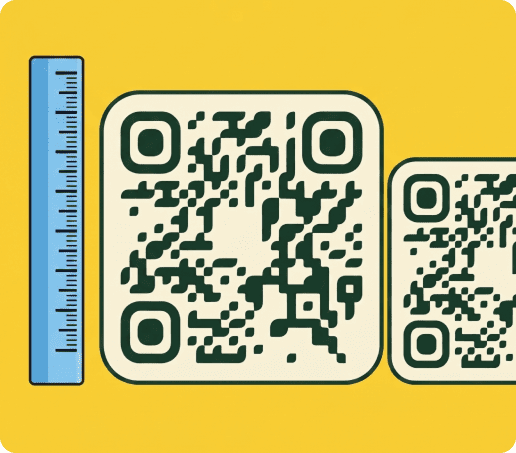
| Minimum size | While QR code minimums can be 1 x 1 cm (0.4 x 0.4 in), a practical minimum is 2 x 2 cm (0.8 x 0.8 in) for reliable scanning. |
| Position | The quiet zone must surround the code evenly on all sides, without interruption from text, images, or other design elements. |
| Color | The quiet zone should match the background color (usually white or a light tone) to clearly separate the code from surrounding elements. |
| Contrast | Maintain strong contrast between the QR code and the quiet zone. Avoid similar colors that make the boundary harder for scanners to detect. |
| Empty space | Keep the quiet zone completely free of logos, text, borders, or graphics. Any intrusion can interfere with scanner recognition and reduce its reliability. |
| Resizing | When resizing the QR code, make sure the quiet zone scales proportionally. Cropping or reducing it can lead to scanning errors or failed scans. |
The 4-module rule (ISO/IEC 18004)
If you look closely at a QR code, you’ll notice it’s made up of many small black and white squares arranged in a grid. Each of these tiny squares is called a module, and they are the basic building blocks that scanners read to understand the code.
To follow the requirements, the quiet zone must be at least 4 of these modules wide on every side.
You don’t need to measure this manually, since most QR code tools add it automatically. What matters is keeping that space clear.
Get started with your first QR code today
Enjoy full access to QRNow and create custom QR codes that look professional and on-brand. Sign up in seconds and start creating immediately.

How To Ensure a Perfect Quiet Zone
A QR code may look correct at first glance, but even the slightest issue with the quiet zone can affect how well it scans. Paying attention to a few key details will help ensure it remains clear and scannable.
-
Use a reliable QR generator
A good tool will create the white space around your QR code automatically and ensure that it meets basic scanning requirements.
Choose a platform that includes a proper quiet zone by default, like our QR code generator, to reduce errors and ensure your code remains easy to scan in real-world conditions.
-
Leave enough space around the code
The easiest way to maintain the correct size for your quiet zone is to leave at least 4 modules of empty space on all sides. This creates a clear boundary that helps scanners detect the code quickly.
Likewise, make sure that other text, images, or background elements don’t interfere with the QR code’s design.
-
Avoid cropping the QR code during placement
Ensure the QR code border is not trimmed or clipped when placing it onto marketing materials. Even small cuts around the edges can reduce the quiet zone and affect scannability.
This often happens when fitting the code into tight layouts or resizing it incorrectly. Always keep the full code and its surrounding space intact to maintain consistent scanning performance.
-
Test the quiet zone before publishing
Scan the QR code in conditions that mimic everyday use to confirm that the quiet zone is sufficient. Test it on different devices, from various distances, and under different lighting conditions. This will help you identify any issues with spacing or visibility before publishing.
Common QR Code Quiet Zone Mistakes
Even the slightest mistake can make a QR code difficult or impossible to scan. Below are some of the most common real-world problems:
- Cropping the QR code during placement: Trimming the edges to fit a layout can remove part of the quiet zone and lead to failed scans.
- Using branded or patterned backgrounds: Logos, textures, or gradients behind the code can interfere with the quiet zone and reduce scan reliability.
- Squeezing the code into tight layouts: Fitting a QR code into small spaces often removes the required margin, especially on packaging, flyers, or business cards.
- Using low-contrast color combinations: Light colors or similar shades around the QR code can blur the boundary and make it harder for scanners to recognize it.
- Placing text too close to the code: Squeezing in CTAs like “Scan here” can reduce the clear space and interfere with scanner detection.
Frequently Asked Questions
Do all QR codes need a quiet zone?
Toggle faqs
Yes, all QR codes need a quiet zone to scan reliably. The quiet zone creates a clear boundary around the code that allows scanners to detect it quickly and accurately.
Without this space, the code may blend into nearby elements, making it harder to read. This applies to both printed and digital QR codes, regardless of where they are used.
What happens if a QR code has no quiet zone?
Toggle faqs
If a QR code has no quiet zone, scanners may struggle to recognize where the code begins and ends. This often results in slow scans or complete scanning failures.
The problem is especially noticeable with codes on busy backgrounds or printed materials. Even if the code looks correct, missing this empty space can significantly reduce its reliability.
How much white space is needed around a QR code?
Toggle faqs
A QR code should have at least four modules of empty space on all sides. This is known as the 4-module rule and ensures scanners can clearly detect the code.
In practical terms, this means leaving a visible margin around the code that is free from text, images, or design elements.
Does background design affect the quiet zone?
Toggle faqs
Yes, the background can directly affect the quiet zone — design elements placed too close to the code can interfere with the clear space required for scanning.
When customizing QR codes with branding elements like colors, logos, or frames, it’s important to maintain proper spacing so the code remains easy to scan.
Are the quiet zone and margin the same in a QR code?
Toggle faqs
Yes, the quiet zone and margin refer to the same concept: both describe the empty space that surrounds a QR code and separates it from other elements.
The term “quiet zone” is more commonly used in technical standards, while “margin” is often used in design contexts. Regardless of the term, maintaining this space is essential for reliable scanning.