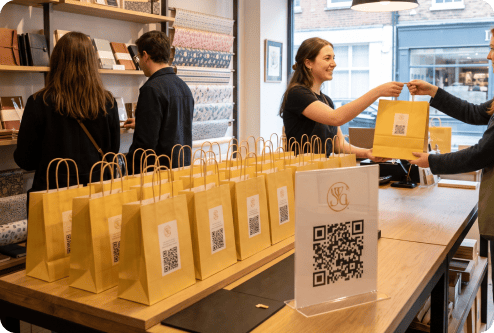
Increased Content Participation With QR Codes on Giveaways

Quick Answer: A URL QR code is often the best choice for a giveaway because it sends participants directly to your entry form with a single scan. A Landing Page QR code can be more useful when you want to combine entry details, prize information, campaign rules, and other useful links in one place.
Adding a QR code to raffle material transforms your promotional items into interactive tools that can drive engagement to your giveaway and your websites and social media profiles.
Here’s how you can use QR codes to increase participation:
- Exclusive offers: Use a coupon QR code to provide discount codes, limited-time deals, or loyalty programs.
- Instant access to digital content: Add a landing page QR code on items to product demos, tutorials, or special messages.
- Social media engagement: Add a social media QR code to different contest promotional material to encourage users to follow your brand and enter raffles.
- Real-time updates: Use dynamic QR codes on promotional material to easily update your deals, links, or campaigns.
Giveaway, Raffle, Sweepstakes, or Contest: What’s the Difference?
Giveaways, raffles, and other promotions are all a bit different in the way people can enter and how winners are chosen. Review the table below to understand how you can use QR codes when you want to create a giveaway.
|
Promotion type |
How it usually works |
How to use QR codes |
|---|---|---|
| Giveaway | A broad term for a promotion where people receive a free item or enter for a chance to win. | Send users directly to an entry form, promotional offer, campaign rules, or a digital reward page. |
| Raffle | Participants usually obtain or purchase tickets, and a winner is selected at random. | Link to ticket details, entry instructions, rules, or the announcement of the winner. |
| Sweepstakes | Winners are chosen by chance, and participants can enter without buying anything. | Send users to an entry form, eligibility requirements, official rules, and no-purchase instructions. |
| Contest | Winners are selected based on skill, creativity, performance, or quality. | Link directly to the submission forms, judging criteria, contest rules, deadlines, or a voting form. |
What Can a Giveaway QR Code Link To?
With a giveaway QR code, you can support your campaign goals by connecting participants directly to the most relevant content or action.
|
Campaign goal |
Best QR code type |
Why it works |
|---|---|---|
| Collect giveaway entries | URL QR code | Sends participants to your entry form |
| Share terms and eligibility rules | PDF QR code | Provides easy access to detailed rules |
| Grow your social media audience | Social media QR code | Instantly connects participants with your socials |
| Offer a discount or prize | Coupon QR code | Lets winners access and redeem a digital offer |
| Promote products and/or services | URL QR code | Directs participants to a product page or online store |
| Explain how to participate | Video QR code | Provides clear visual instructions without adding lengthy printed text |
| Collect opinions after the campaign | Feedback QR code | Makes it convenient for participants to share feedback |
How To Generate QR Codes for Giveaways and Raffles
Creating a QR code for your giveaway or raffle is quick and simple with QRNow’s QR code generator.
Follow these steps to make a custom QR code that fits your brand and can be easily found on any of your material.
-
Register your account
Create an account on QRNow.com to create the type of code that works best for you. By using a dynamic QR code, you can use built-in tracking and customization features to optimize your giveaway campaign easily.
-
Fill in your QR code details
Decide where your code will take your users. You can link it to an entry form, giveaway rules, discount page, or any other relevant content.
-
Tailor your QR code
Make your QR code match your marketing materials by tailoring its colors, adding your company logo, and selecting a frame that is easy to scan and calls attention to your brand.
-
Download your QR code
Once you’re satisfied with the design, download your QR code in a high-resolution format like PNG, JPEG, or SVG to make sure it is easy for users to scan.
-
Place it on your giveaway design
Place your code somewhere it can easily be seen on your giveaway items or promotional materials.
Use a clear call to action, such as "Scan to Enter" or "Claim Your Prize," to encourage participation.
-
Track and analyze your campaign
Monitor the performance of your QR code with real-time analytics. See how many people scan the code, where they are scanning from, and what they do once they scan, such as signing up for the raffle.
QRNow data insight: QR codes are a great way to help your business increase brand engagement, capture leads, or drive traffic to your website, videos, and more.
They're especially popular with teams running promotions. Among businesses who use QRNow tools, 82% are small businesses, followed by 9% medium-sized companies, 4% small-to-medium businesses, and 2% large businesses. The remaining users include government organizations.
How QR Codes Are Used on Giveaway Materials in Retail, Restaurants, and More
QR codes can help your business increase brand engagement, capture leads, or drive traffic to your website, videos, and more. Here are examples of how different industries can use QR codes on giveaways effectively.
-

Retail and E-commerce
If you run a store or an online shop, QR codes on promotional items like tote bags or water bottles can direct your customers to discount codes, exclusive product release dates, or other types of sign-ups.
-

Hospitality and tourism
If you’re involved with hotels, airlines, and travel agencies, you can add codes on luggage tags, key cards, or welcome kits.
This way, you can make providing guests with key travel information very simple.
-

Events and conferences
At trade shows or corporate events, you can add a code to branded merchandise like notebooks or pens to direct your attendees to information related to speaker schedules, digital brochures, or networking opportunities.
-

Fitness and wellness
Do you work at or own a gym or spa? Try placing a list of links QR code on water bottles, towels, or wristbands to link users to all of your gym’s workout guides, class schedules, or special membership discounts.
-

Food and beverage
Restaurants, cafés, and other dining locations frequently use QR codes. Your dining establishment can add QR codes to raffle items like reusable cups or coasters and direct customers to menu specials, rewards programs, or online ordering platforms.
Rules, Eligibility, and Compliance for QR Code Giveaways
Before launching, publish clear rules and link them from the QR code entry page. You should include:
- Age, location, and other eligibility restrictions
- Entry methods, campaign dates, and prize details
- Winner selection and notification procedures
- Sponsor information and data-use disclosures
Sweepstakes should provide free entry and never suggest purchases improve winning chances. Raffles may face stricter state or local restrictions. Remember to review applicable laws and platform policies before you announce your giveaway.
Best QR Code Size for Giveaways
If you print your QR code too large or too small, it can have a negative impact on its scanability and can ultimately affect participation in the contest.
Here are some tips on how large your QR code should be:
|
Giveaway material |
Recommended QR code size |
|---|---|
| Receipts & small labels | 0.8 x 0.8 in / 2 x 2 cm minimum |
| Flyers & brochures | 1 x 1 in / 2.5 x 2.5 cm or larger |
| Packaging | 1 x 1 in / 2.5 x 2.5 cm or larger |
| Table & counter displays | 1.2 x 1.2 in / 3 x 3 cm or larger |
| Posters & event signs | 2 x 2 in / 5 x 5 cm or larger |
| Promotional merchandise | Adjust to the item and test before production |
Design and Print Specification for Giveaway QR Codes
Follow these design and print recommendations to keep your QR code clear and easy to scan.
- File setup: Use SVG to keep the QR code sharp when resized, then export the complete design as a high-resolution PDF.
- Spacing and placement: Leave a clear border around the code and keep away from folds and curves.
- Color & CTA: Use a dark code on a light, plain background, and place a clear prompt such as “Scan to Enter” nearby.
- Material & finish: Print on a flat surface and, when possible, select a matte finish to reduce glare that may interfere with scanning.
- Print proof: Scan a printed sample with several phones at the expected scanning distance before printing the final version.
FAQs
-
You can add QR codes to items related to any type of product giveaway, contest, sweepstakes, raffle, or loyalty reward program.
QR codes make it easier for participants to enter, engage with your brand, and access exclusive offers.
-
There are a number of types of content that you can link your code to.
You can link to entry forms, giveaway rules, exclusive discounts, product demos, and much more. Also, dynamic codes let you update the content even after printing.
-
It’s critical to place a code where it can be easily seen. Try placing the QR code on the front of a giveaway item, packaging, or an attached tag.
However, make sure there’s enough contrast between the QR code and the background, and add a clear call to action, like "Scan to enter" to encourage interaction.
-
The best and probably clearest option for a CTA is “Scan to Enter.” If you have extra space, you can add an incentive, such as “Scan to Win a $100 Gift Card" or whatever the prize is, so that participants can understand the benefit.
-
Yes, you can print it on a smooth area with strong contrast and enough surrounding space. Try to avoid folds, seams, and tight curves. Then, test the finished item before distributing it.
-
Yes, one QR code can send participants from every location to the same entry page. However, use separate trackable codes if you want to compare scans between locations.
-
Configure the entry form to limit submissions by verified email or account. You can also use CAPTCHA, unique entry codes, and manual reviews to identify suspicious or repeated entries.
-
Update the landing page to show that entries have closed. If the code’s destination is editable, redirect scanners to a winner announcement, thank-you page, or upcoming promotion.
