Variety of Download Formats for Your QR Codes
Our QR code generator allows you to download your QR codes in formats that match your specific needs. Whether you're designing for print, web, or professional branding, we offer high-quality options like PNG and JPG, along with scalable formats like SVG and PDF.
Keep reading to find out how to simplify sharing your products or promotions with the perfect QR code download option.
What’s the Best Export Format for Your QR Code
Use this quick guide to choose the best image format for your online QR codes:
|
Format |
Best For |
Why |
Mistakes to Avoid |
|---|---|---|---|
| SVG (vector) | Large prints, posters, and signage | You can resize your code without losing resolution | Adding effects like glow or shadow that blur modules and make your code hard to scan |
| PNG (raster) | Websites, social media, apps, small posters | Works everywhere and can have a transparent background | Using low resolution for print can affect quality. Aim for 300 DPI or more and keep a strong contrast and a white border. |
| JPG (raster) | Sharing small files via email or chat | Compressed files are easy to send almost anywhere | Heavy compression, repeated re-saves, and upscaling tiny files can blur a JPG QR code and make it unscannable. |
| PDF (vector container) | Menus, flyers, coupons, sending to a print shop | Maintains quality and color profiles, and is easy for printer workflows | Check the page size and margins, and avoid exporting image-only fuzzy PDFs. |
| EPS (vector) | Jobs sent to professional print shops or design agencies | Editable and great for large formats | Don’t convert to a flat image, and remember to include the font files and assets included in your design. |
| vCard / VCF QR | Sharing contact details quickly in sales, real estate, events, and more | One scan saves your key information to the scanner’s phone | Update outdated contact details and use short URLs to eliminate very long links that stuff too much data. |
Choose From Multiple QR Code Download Formats
Our QR code maker offers a selection of download formats that are specialized in sharing different products, images, and more. Take a look at the different formats available, and which can work best for you and your business:
-

EPS format
QR codes in EPS format are print-ready files used in professional design software. This format keeps QR codes editable and perfectly clean for high-quality printing.
Pros Cons Fully scalable without loss of quality Needs graphic software to view Compatible with professional design tools Not suitable for quick sharing When to choose EPS
EPS is the right choice when you’re sending your QR code to a professional printer or designer who needs to resize or edit it without losing quality. It’s the best format to print QR codes for large-scale projects, like packaging, billboards, or branded materials.
-

SVG format
The SVG format is a web-based vector file that loads quickly, works on all browsers, and keeps your QR code crisp on any screen. It’s usually considered the best QR code format for designers.
Pros Cons Lightweight and scalable for responsive web and UI May render inconsistently on older browsers Stays sharp at any resolution Can be harder to edit for non-designers When to choose SVG
Choose SVG when your QR code will be used mainly online, whether on websites, apps, or digital screens. It’s lightweight, loads fast, and keeps clean edges. It’s also easy to edit if you need to adjust colors or add your logo later.
-

JPG format
The JPG format is a compressed image file that reduces size by slightly lowering quality, making it lightweight and easy to share
Pros Cons Supported on all devices May blur fine details Quick to upload and share No transparency When to choose JPG
Select a JPG export when you need a small, easy-to-share file. This is the right choice if you want to send your QR code by email, chat, or add it to a newsletter. JPGs are designed for when image size matters more than perfect quality, so avoid using it for printing.
-

PNG format
The PNG format is a high-quality image file that keeps details sharp and supports transparent backgrounds for digital use.
Pros Cons Transparent background for smooth branding Quality degrades if resized Retains quality after compression Not ideal for print materials needing ultra-sharp output When to choose PNG
Choose PNG when you need a clear, high-quality QR code for screens or small prints like posters and flyers. It also works well for websites, social media, or apps where you want a clean look and a transparent background. Avoid using it for large print jobs.
-

PDF format
The PDF format is a universal file type that preserves the look of your design across all devices and printers.
Pros Cons Professional and print-ready Often larger file size than image formats Can be secured with passwords or encryption Not easily embeddable in websites or social feeds When to choose PDF
Export using a PDF format when you’re planning to print your QR code as part of a larger design, such as for menus, invitations, or brochures. It’s the safest choice for keeping layout, colors, and details exactly as designed.
-

vCard format
vCard QR codes integrate contact information, allowing users to save details directly into their phone contacts.
Pros Cons Embeds direct contact info Less space for customization Easy to scan and save into phone contacts Can’t contain visual design elements When to choose vCard
Choose vCard when you need a QR to share contact details instantly. It’s the best way to make a digital business card and is perfect for networking events or sharing your agents’ details.
How to update your QR codes for any format
Choosing the right format for your QR code is just the beginning. With QRNow, you can make sure your codes remain effective. Here’s how you can update your code:
-
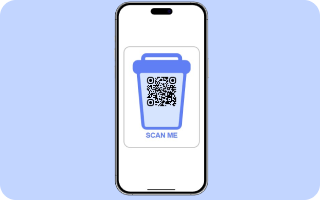
Customize the style
Select colors and unique styles to optimize readability and make your QR codes visually appealing.
-
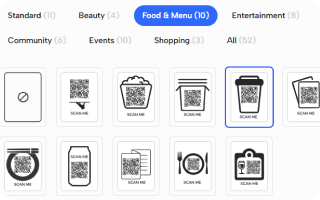
Choose a frame
Select from categories like “Community,” “Food & Menu,” “Events,” and more to find a QR code frame design that best fits your marketing strategy.
-
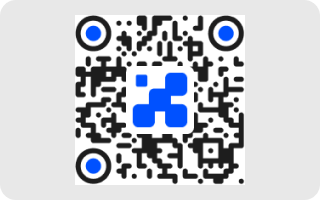
Add your business’s logo
Upload your brand’s logo to place it in the center of the QR code, strengthening brand recognition.
Our tool allows you to keep your QR codes on point while taking full advantage of the benefits of the chosen format.
Your privacy when using different QR code export formats
Whichever export format you choose, QRNow applies a privacy-first approach. We minimise what data we collect, encrypt transfers with SSL/TLS software, and never sell your data.
We’re proud to comply with FTC and other international regulations on data protection. For vCards, which contain personal details, we give you clear controls for consent, access, and deletion, so you stay in charge of your information.
FAQs
What is the best format to download a QR Code?
Toggle faqs
For your business, SVG is usually considered the top choice. This format is a scalable vector format that typically guarantees crisp quality for print use.
If your needs are only for digital use, PNG offers transparency and lossless quality, while JPG delivers smaller file sizes for fast loading. However, other formats can be used based on your business and how you'll use it.
Can I download one QR code in different file formats?
Toggle faqs
Yes! For example, our QR code generator allows you to generate a code and export it in multiple formats like SVG, JPG, or PDF. You can choose the format that works best for your business and get consistent branding across print, web, and marketing materials.
What is the SVG format for QR code?
Toggle faqs
SVG (Scalable Vector Graphics) is a vector‑based format that keeps your code’s clarity at any size.
It’s light enough for web use yet a good choice for professional print, so that you can edit your code’s colors, shape, or even embed the AI logos created with our generator.
Should I export my QR code in PNG or SVG?
Toggle faqs
Choosing PNG vs SVG QR codes depends on where you’ll be using the code.
For flexible sizing and editing for web design or large-scale printing, use SVG. It’s a vector format that can be resized cleanly, without affecting quality. PNG is a fixed-resolution image, so it’s good for codes that will be used in emails or on social media.
What's the best way to download a QR code?
Toggle faqs
Using our QR code generator, you can create and download your code by doing the following:
- Enter your dashboard on QRNow
- Design your code online, tailored to your branding
- Download and export high-resolution files in the format you need
Plus, if you use a dynamic QR code with advanced features, you can update it at any time, in case you need to change its URL or file
Is JPG or PNG better for printing QR codes?
Toggle faqs
If you’re considering JPG vs PNG QR codes for print, the best option is usually PNG.
JPG files are compressed, and this can affect scannability. Instead, opt for a PNG export and print using at least 300 DPI for the best results. Keep the contrast strong in your design to improve scan quality.
